Start cabochon cutting by drawing the finished outline, adding a deliberate shaping allowance and placing straight relief cuts outside that retained boundary. The saw makes an oversized polygonal preform; suitable grinding and polishing equipment creates the final curve. Choose the saw from the starting stock, and screen the exact blade separately.
Start with the finished outline, not the saw cut
If the stone must fit an existing setting, record the required length, width and any shape constraints before drawing on the slab. For a freeform cabochon, decide which visible feature matters most. For a pair, define whether matched means equal dimensions, mirrored pattern, similar color or simply the same source material. These goals produce different layouts.
Try the outline on a photograph or transparent overlay first. Mark the intended top face and orientation, and photograph paired layouts together. Pattern placement is a design choice, not a machine specification; material-specific inspection belongs in the agate and quartz-and-jasper guides.
Build a retained envelope with a visible allowance
The sawn blank is not the final perimeter. Draw the finished outline first, then a separate retained envelope outside it for later shaping. The correct allowance depends on the material, setting tolerance, grinding method and your process; no single millimeter value is universal.
Worked layout: suppose the intended oval is 30 by 22 millimeters. An illustrative two-millimeter allowance on every side makes the retained envelope 34 by 26 millimeters: add twice the allowance to each finished dimension. Two millimeters is an example, not a recommendation. If the complete 34-by-26 envelope will not fit the selected area, rotate, resize or reject the layout before cutting.
Turn the curved outline into a supportable polygon
Draw straight tangent or relief lines outside the retained envelope so the remaining blank is a rough polygon. Hi-Tech Diamond's compact trim-saw manuals say the blades cut straight lines and prohibit curves. Leave the final curve for suitable shaping equipment; do not twist the material or side-load a circular blade to trace an oval.
Numbering the proposed cuts on a photograph can expose a bad sequence, but the sketch is not an operating instruction. Before every physical cut, confirm that the next retained piece can still be supported by the exact machine's approved method. Stop if the plan would require hand-stabilizing an unstable piece, forcing the blade or sacrificing the retained boundary.
One relevant starting point
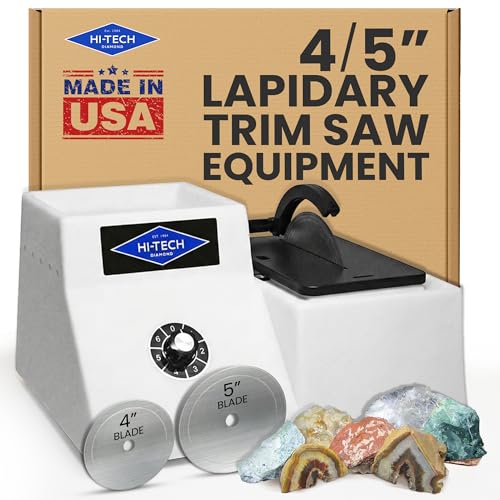
4″ / 5″ trim saw
Saved base 4-inch / 5-inch saw offer; no vise is represented. Confirm the selected blade size, supplied blades and current contents.
Check current price See model detailsAs an Amazon Associate I earn from qualifying purchases. Check the current listing for price, availability and included accessories.
Choose the saw from the starting stock
A purchased slab that needs straight relief cuts is a trim-saw workflow. Whole rough that must first become repeated parallel slices is a separate slabbing job. The Saw Finder asks for the actual stock height in the proposed cutting orientation—not the finished cabochon's length or width—plus the job, identified material, planning budget and whether stable workholding is genuinely confirmed.
Worked Finder check: trim job, 6 millimeters of identified agate, millimeter units, the $600 planning band and confirmed stable workholding returns the saved 4/5-inch and 6-inch trim-saw families. That result is only a conservative height-and-budget screen, not approval of the specimen, blade or fixture. Changing workholding to unconfirmed correctly produces no offer; a no-match is a reason to resolve the setup, not to force the cut.
Screen the exact blade separately
The Blade Checker screens diameter, arbor and rated RPM before the less visible questions. For its saved Hi-Tech 6-inch model, entering a 6-inch blade, 0.625-inch arbor and 3,400-RPM rating with the remaining requirements unconfirmed returns “dimensions align; fit is not confirmed.” A 3,399-RPM rating fails the recorded speed screen.
A dimensional pass is preliminary. Confirm the selected blade variation's construction, core and kerf, material application, coolant permission, guard clearance and the label on the exact machine. The current 6-inch saw page documents a 5/8-inch arbor and 800-to-3,400-RPM range, but that does not make every 6-inch marketplace blade suitable. Use the blade-selection guide for the complete order of checks.
Use Slab Yield upstream, not to count cabochons
The Slab Yield Calculator can plan repeated straight slices before preform layout when the rough, machine and workholding are already suitable. It cannot nest curved outlines on a slab or predict pattern quality, fractures, edge losses, shaping allowance or finished recovery.
Worked arithmetic: enter 32 millimeters along the slicing direction, 4-millimeter planned slabs, a measured or documented 0.5-millimeter kerf and a 3-millimeter total facing/trimming allowance. The tool gives 29 millimeters usable, six slabs, 2.5 millimeters lost to five separating cuts and 2.5 millimeters remaining. Seven slabs would require 31 millimeters after the allowance and do not fit. These are illustrative inputs, not recommended dimensions; six planned slices do not mean six usable cabochon preforms.
Accept the sawn blank before promising the finish
After the straight cuts, place the template back on the polygonal blank. The entire finished outline should remain inside the retained envelope, the chosen face and orientation should still be identifiable, and setting-critical dimensions should still have stock for the planned shaping stage.
If a relief cut entered the retained boundary or exposed a defect, revise the finished plan rather than promising the original size. Keep the reference photograph and label with the blank until shaping is complete. A sawn preform is an intermediate result, not evidence that the final cabochon dimensions or polish are guaranteed.
Common questions about cabochon cutting and preform planning from a slab
Can I cut an oval cabochon directly with a trim saw?
Do not steer a circular trim-saw blade through a curve. Plan straight cuts around an oversized blank and develop the final contour using suitable shaping equipment.
How much extra material should I leave around a preform?
Allow for the intended shaping process, material and setting tolerance. Draw the final outline and a separate retained boundary. The worked two-millimeter allowance is illustrative only; there is no universal value for every project.
Do I need to buy a slab saw to make cabochons?
Not necessarily. If you buy suitable slabs, a trim saw may cover the sawing stage. Cutting your own slabs from whole rough is a separate equipment requirement.
What measurement goes into Saw Finder for a cabochon project?
Enter the actual stock height in the proposed cutting orientation, not the finished cabochon's length or width. Keep workholding unconfirmed unless the exact setup genuinely supports the piece.
Does a Blade Checker pass approve the stone and blade?
No. It screens recorded diameter, arbor and RPM inputs. Material application, construction, kerf, coolant, guard clearance, installation and workholding still require exact manufacturer confirmation.
Can Slab Yield estimate how many cabochons fit on a slab?
No. It estimates repeated straight slices with kerf and an explicit allowance. It does not model two-dimensional preform nesting, pattern placement, cracks, grinding margins or finished recovery.
Sources and documentation
Compare current Amazon offers
4″ / 5″ trim saw
Saved base 4-inch / 5-inch saw offer; no vise is represented. Confirm the selected blade size, supplied blades and current contents.
Check current price See model details
6″ trim saw
Saved base 6-inch saw offer; no vise is represented. Confirm the supplied blades and current contents.
Check current price See model detailsAs an Amazon Associate I earn from qualifying purchases. Check the current listing for price, availability and included accessories.
Keep exploring
Materials
Cutting Agates: Plan the Pattern Before the First Slice
Plan agate cuts from rough or slabs: compare blade types, confirm stable workholding, budget kerf and choose a suitable lapidary saw.
Materials
How to Cut Quartz and Jasper With a Lapidary Saw
Plan quartz and jasper cuts by specimen identity, visible features, blade application, measured capacity and secure workholding without assuming one setup fits both.
Blades and care
Lapidary Saw Blade Selection: Size, Arbor, RPM and Kerf
Choose a lapidary saw blade by diameter, arbor, maximum rated RPM, rim construction, core thickness, kerf and material support.